Phone GPS Tracker
- 3.8
- Rating
- 5.00M
- Installs
- Free
- Price
 Analysis by App-foxy
Phone GPS Tracker is a free Maps & Navigation app from nd5star that focuses on keeping family members connected through location sharing. I approached it as the kind of tool someone might install before a busy week, a long trip, or a change in household routine, then asked a more important question: does it remain useful once the novelty of watching a map wears off?
My first impression was straightforward. The app is built around a familiar need rather than an elaborate feature set: knowing where the people you care about are, and allowing them to share their position with you. That makes it easy to understand, but it also means its lasting value depends less on entertainment and more on whether everyone in the family remembers to use it consistently.
What the first week feels like
During the first week, a family locator naturally attracts attention. After installation, the obvious temptation is to check the map repeatedly, especially when someone is commuting, walking home, or traveling somewhere unfamiliar. That immediate reassurance is the strongest part of the experience. Instead of sending several messages such as “Where are you now?”, you can use a location view as the starting point for a conversation.
You May Also Like

 Blood Strike: 2.5 Anniversary
Blood Strike’s Loadouts Turn Every Drop Into a Tactical Gamble
A close look at Blood Strike’s custom loadouts: how fast access to signature weapons reshapes its battle royale rhythm, rewards preparation, and narrows the gap between fights.

 Pandora - Music & Podcasts
Pandora’s Music Is Easy to Start, but Harder to Recover
Pandora’s strength is its low-effort path from a seed to a station. Its weak spot is how much confidence it asks you to place in connection, setup, and quiet recovery.

 8 Ball Pool
 Is Built on Rivalries, Rematches, and Routine
A close look at the rivalries, rematches, shared routines, and unanswered safety questions that turn a quick pool match into a persistent mobile community.

 Samsung Music
’s Quiet Strength Is Playing What You Already Own
Its reach comes less from spectacle than from dependable access to a personal library. That simplicity is both the app’s strongest retention engine and its ceiling.

 AccuWeather: Weather Radar
AccuWeather Review: A Quick, Clear Forecast for Everyday Decisions
For everyday plans, the best forecast is the one you can understand quickly. AccuWeather makes rain timing, radar, and local conditions easy to act on, with a few trade-offs.

 Hill Climb Racing
Why Hill Climb Racing Still Turns Crashes Into One More Run
A tiny car, a bumpy hill and one more upgrade: Hill Climb Racing keeps resurfacing because its simple chaos makes every near-miss feel personal.
More From Our News Desk



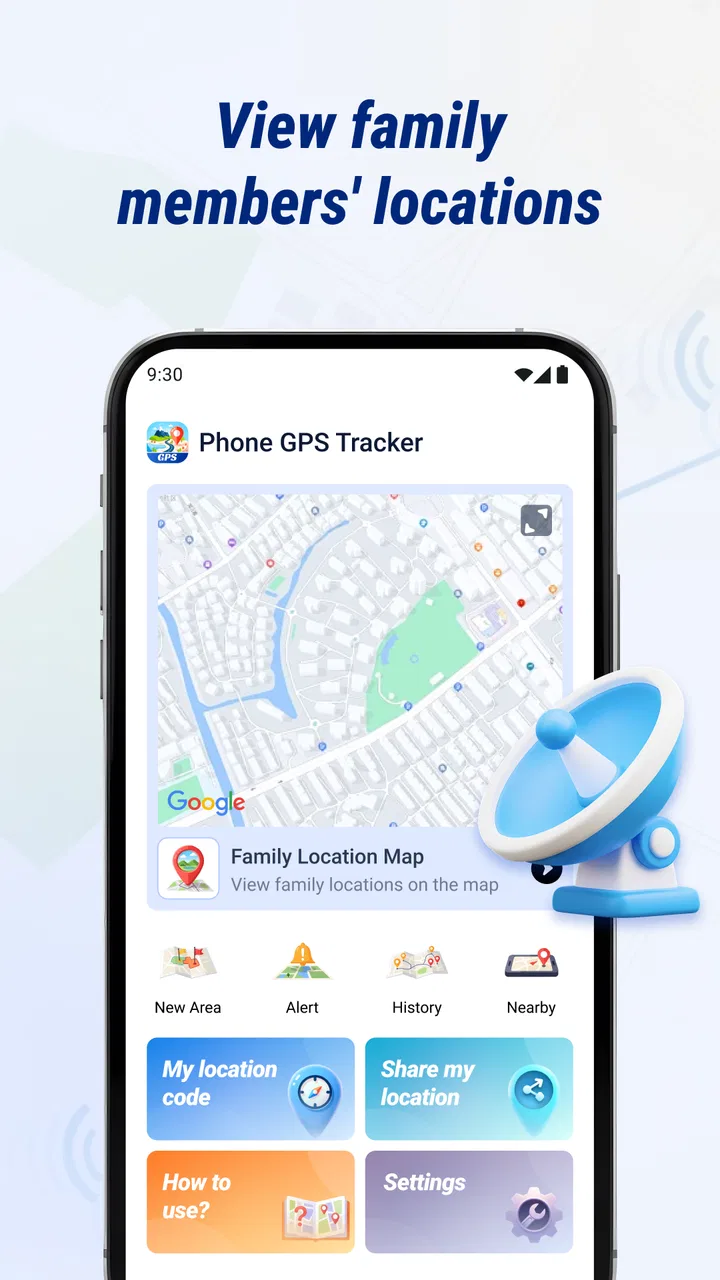
I think the app is most convincing when the household agrees on a simple purpose before using it. For example, parents might use it to know when a child has left school, partners might use it during separate commutes, or relatives might coordinate arrival during a family visit. Without that shared agreement, location sharing can quickly feel intrusive rather than helpful.
The app’s positioning as a phone GPS tracker makes it especially approachable for people who do not want a complicated navigation system. You do not need to learn route planning, saved places, or a large collection of travel tools to understand the central idea. The focus is narrower, and that can be an advantage for a family member who is not comfortable with technology.
One practical tip I would give new users is to establish a check-in routine instead of treating the map as something to monitor constantly. A household could agree that location is checked before a late journey, after a planned arrival time, or when someone’s schedule changes. This reduces unnecessary checking and gives the app a clear role rather than turning it into a source of background anxiety.
The first week also reveals an important trade-off. A tracker is only as useful as the phones and people participating in it. If one person forgets to share their location, changes devices, or stops opening the app, the map may not provide the reassurance the family expected. That is not a small detail; it is the difference between a dependable routine and an app that gets opened enthusiastically for a few days and then forgotten.
Where it fits into an ordinary day
Consider a realistic weekday. One family member leaves work later than expected, another is waiting at home, and a child is traveling from an activity. Rather than sending a chain of messages, the family can use the shared location context to decide whether to wait, start dinner, or make a call. The app does not remove the need for communication, but it can make those conversations more informed.
That distinction matters. I would not use this kind of tool as a replacement for a phone call in an emergency, and I would not assume that a map position proves someone is safe. A location can be delayed, imprecise, or misunderstood. Its best role is everyday coordination and reassurance, not emergency response or surveillance.
The Everyone content rating also makes the app broadly approachable for households, although an age label alone does not settle the question of whether a particular child should participate. I would explain location sharing clearly, agree on boundaries, and make sure every person understands who can see the information. The social agreement around the app is just as important as the installation itself.
What makes the early appeal useful
The early appeal comes from reducing uncertainty. When a loved one is on the way home, a shared location can answer a basic practical question without requiring the person to stop and type. For older relatives, it may offer a simple way for family members to stay connected. For travelers, it can help others follow progress without repeated updates.
There is also a useful planning habit hidden in the app’s concept: use it to support expectations, not to police movement. If everyone knows the intended destination and approximate arrival, a location view can highlight when plans have changed. Used respectfully, that can save time. Used obsessively, the same feature can create tension and encourage people to interpret every pause or detour.
Whether it earns a place after the first month
After the first month, the question changes from “Can this show me where someone is?” to “Do we still have a reason to open it?” In my view, Phone GPS Tracker has recurring value for families with genuinely changing schedules. Shift work, school activities, regular long commutes, and relatives living apart all create situations where shared location can remain relevant.
For a household with predictable routines, the value is less constant. If everyone leaves and returns at nearly the same times, a messaging app may be enough. The tracker becomes more worthwhile when plans often move, when several people need the same update, or when a family wants a shared view instead of separate one-to-one messages.
This is where the app’s modest focus can work in its favor. It is not competing for attention with a large social feed, a game, or a full travel-planning suite. That makes it easier to reserve for a specific purpose. I would keep it as a quiet utility rather than an app I opened every hour.
The developer, nd5star, presents it as a family location and sharing tool, and that identity is important when deciding whether it belongs in your routine. If you are looking for detailed turn-by-turn navigation, public transit planning, hiking maps, or a complete driving assistant, this is the wrong category of product. A standard navigation app will be better for getting somewhere; this app is more relevant to knowing where participating people are.
Three habits that improve long-term usefulness
First, I would create a clear “why” for each shared group. A group for daily family coordination should not be treated the same way as a temporary group for a trip. Separating those purposes helps users understand when sharing is expected and when it can be paused. It also prevents the app from becoming a vague, permanent window into everyone’s movements.
Second, I would pair location sharing with a verbal plan. Before a late journey, say where the person is going and when they expect to arrive. Then the map becomes a way to understand progress rather than a substitute for context. This is a small change, but it avoids the common mistake of treating a location dot as a complete explanation.
Third, I would review the household routine occasionally. If a child’s schedule changes, a relative no longer needs regular monitoring, or a trip has ended, remove that situation from the routine. A location app has more lasting value when it reflects current needs instead of collecting unused sharing arrangements.
These habits are not flashy features, but they are the difference between a useful family tool and a forgotten installation. The app’s recurring value comes from disciplined use, not from repeatedly checking the map just because it is available.
How it compares with familiar alternatives
The usual alternative is a messaging app. Messages are better when you need an explanation, a photo, a quick change of plan, or a direct conversation. Phone GPS Tracker is more convenient when the question is simply whether someone is still moving toward a destination or has reached a general area. In practice, I see them working together rather than competing directly.
Another alternative is a built-in device location service. Those tools may already be familiar to users who want to locate their own phone or share with a small circle. A dedicated family locator can feel more focused, but the advantage depends on how comfortably the household adopts it. If everyone already has a dependable sharing routine elsewhere, moving to another app may create more friction than benefit.
Traditional phone calls remain better for urgent situations, sensitive conversations, or anything that needs confirmation. A map cannot tell you why someone has stopped, whether they need help, or whether the displayed position is current enough for a critical decision. I would never let the presence of a tracker replace direct contact when safety is genuinely in question.
For navigation itself, dedicated map applications are the stronger choice. They provide the tools needed to choose routes, compare roads, and follow directions. Phone GPS Tracker makes more sense beside those tools, not instead of them. Its value is the relationship between people, not the quality of a route from one address to another.
Maintenance, privacy habits, and everyday friction
Any location-sharing app creates maintenance work, even when the interface is simple. Users need to remember who is included, keep expectations clear, and check that the app still fits the family’s current routine. I would treat those tasks as part of using the product rather than assuming installation solves everything permanently.
The most important maintenance habit is a periodic privacy check. Ask who can see the location, whether that access is still appropriate, and whether everyone remains comfortable with the arrangement. A family member may agree during a trip but not want the same level of sharing indefinitely. Respecting that difference protects trust, which is essential for a tracker to remain useful.
Battery and connectivity are practical concerns for any GPS-based experience. I would avoid judging a location as exact when a phone has poor reception, limited power, or a delayed update. If the app is being used for an important journey, make sure the person carrying the phone has a charged device and knows that the tracker is part of the plan. That preparation is more reliable than assuming the map will always update perfectly.
Another source of friction is notification fatigue. If every movement generates attention, the household can become tired of the app and stop treating it as useful. I prefer using it around meaningful events: departure, expected arrival, a long delay, or a change in plans. The fewer unnecessary checks there are, the more seriously people take the information when it matters.
Who should use it, and who should skip it
I would recommend Phone GPS Tracker to families that want a focused way to share whereabouts and are willing to establish mutual rules. It is a sensible fit for households with changing schedules, relatives who travel often, or people who want less back-and-forth messaging during routine journeys.
I would be more cautious about recommending it to someone who wants covert monitoring, highly detailed navigation, or guaranteed emergency protection. The app should be used openly and consensually. It is also a poor fit for a household that already has a location-sharing system everyone uses comfortably; adding another tool may simply create duplicate checks and confusion.
People who dislike location sharing altogether should skip it. No app can make an unwanted tracking arrangement feel healthy. The strongest use case is one where every participant understands the benefit, knows the boundaries, and can discuss changes without pressure.
What the current release tells me
The current version is 1.7.1.0, and the app supports devices running Android 7.0 or later. That gives it a broad potential device range, which is helpful in families where not everyone owns a recent phone. I would still make sure each participating device behaves reliably before depending on the app during a trip or schedule change.
Its free price lowers the barrier to trying it, but “free” does not remove the need to consider attention, battery, privacy, and household agreement. Those are the real costs of a location-sharing routine. I would test it during ordinary errands first, then decide whether it deserves a permanent place in the family’s habits.
The app has passed one million installs and holds an average rating of 3.8 from around 7.9 thousand ratings. I read that as a sign of reasonable interest with a mixed experience rather than universal satisfaction. The numbers do not persuade me to install it by themselves, but they do suggest that the concept is familiar enough to have found a substantial audience.
My long-term verdict
Phone GPS Tracker earns lasting space when it solves a repeated coordination problem. If your family regularly asks where someone is, waits for arrivals, or manages separate schedules, a dedicated location-sharing tool can become a quiet convenience. Its best quality is not novelty; it is the possibility of removing small amounts of uncertainty from ordinary days.
At the same time, I would not keep it installed simply because tracking feels reassuring during the first week. Without agreed boundaries and a practical routine, the app can become background noise, a source of unnecessary checking, or an extra service that nobody remembers to maintain. The long-term test is whether it helps people communicate better, not whether it encourages them to watch a map more often.
My recommendation is to try it with one clearly defined use case, such as coordinating school pickup or a regular late commute. Give everyone a chance to understand the sharing arrangement, use the map alongside normal communication, and reassess once the immediate reason has passed. That approach reveals its real value without turning it into a permanent surveillance habit.
For me, the app is best understood as a focused family utility: useful, accessible, and potentially reassuring, but dependent on responsible routines. It is not the strongest choice for navigation, emergency response, or users who already have a trusted alternative. For the right household, however, the lasting benefit is less guesswork without replacing human communication. That is a modest promise, but it is one the app can satisfy when people use it thoughtfully.
FAQs for Phone GPS Tracker
01What is Phone GPS Tracker and what does it do?
Phone GPS Tracker is a location-based utility designed to help users view and share the position of a smartphone using GPS, mobile networks, or Wi-Fi. Depending on the version and enabled features, it may support location history, map viewing, device monitoring, or sharing with trusted contacts. It is intended for legitimate tracking purposes, such as finding your own device or coordinating with family members who have provided consent.
02Does Phone GPS Tracker require an internet connection and GPS access?
Yes, reliable tracking generally requires location services to be enabled and an active internet connection through mobile data or Wi-Fi. GPS provides the most accurate outdoor position, while network-based location may be used when GPS signals are weak or unavailable. Accuracy can be affected by buildings, weather, battery-saving settings, poor reception, and whether the phone is indoors or underground.
03Can I track another person’s phone without their permission?
You should not use Phone GPS Tracker to secretly monitor another person. Location tracking involves sensitive personal information, and the person being tracked should clearly understand and agree to it. The app is best used for your own devices or with family, friends, employees, or other users who have knowingly enabled location sharing. Local privacy and consent laws may also apply, so check them before using tracking features.
04Does Phone GPS Tracker drain the battery or use much mobile data?
Continuous location tracking can consume more battery than normal phone use because GPS, background services, and network communication may remain active. Data usage is usually moderate when the app sends occasional location updates, but it can increase with frequent refreshes, live tracking, map loading, or location history synchronization. Adjusting update intervals and allowing tracking only when necessary can help reduce battery and data consumption.
05Is Phone GPS Tracker free, and are there any privacy or security concerns?
The basic download may be free, but some Phone GPS Tracker versions can include advertisements, subscriptions, or paid features such as unlimited history, real-time updates, or additional devices. Before installing, review the store listing, permissions, privacy policy, and subscription terms carefully. Because location data is highly sensitive, use a strong account password, avoid sharing access credentials, and download only from the official Google Play Store or Apple App Store.
Pros
- Real-time location updates help you monitor a phone’s current position.
- Location history can make it easier to review recent movements.
- Useful for coordinating family members during trips or daily routines.
- Simple map-based interface is easy for most users to understand.
- Can provide reassurance when checking on a child or elderly relative.
Cons
- Accurate tracking depends on GPS
- mobile data
- and the phone’s battery level.
- Continuous location sharing may noticeably increase battery consumption.
- Privacy concerns arise if tracking is enabled without clear consent.
- Indoor locations and weak signals can produce delayed or inaccurate results.
- Some features may require a subscription or additional in-app purchases.

Phone GPS Tracker
Gallery